Using API v1? See what changes in v2, or the v1 docs
OpenAI
This guide adds a calendar assistant to your server with OpenAI's API, with Chat Completions or the Responses API. The assistant uses Pyas's tools for the signed-in user only, and each change waits for them to approve it.
The code was tested with gpt-5.5. Any model that calls functions works. See AI in your app for how the tools work.
Install
npm install @pyas/ai-tools openai
Set these on your server:
PYAS_API_KEY=pyas_sk_test_...   # a test key from API keys in the Pyas dashboard
OPENAI_API_KEY=sk-...
The assistant
The assistant has two functions. ask sends the person's message. answer sends which of the waiting changes they approved. Each returns what to show the person: a reply, or the changes to approve.
import OpenAI from 'openai'
import type { ChatCompletionMessageParam } from 'openai/resources/chat/completions'
import { pyasFunctionDefinitions, runPyasToolCalls, type PyasPendingToolCall } from '@pyas/ai-tools/openai'

const openai = new OpenAI()

/** One person's conversation with the assistant. Save it between requests, for example in your database. */
export interface Conversation {
    messages: ChatCompletionMessageParam[]
    /** Changes waiting for the person, with the results that go back to the model alongside them. */
    waiting?: { results: ChatCompletionMessageParam[]; pending: PyasPendingToolCall[] }
}

/** What to show the person: the assistant's reply, or the changes waiting for their approval. */
export type Turn =
    | { reply: string }
    | { changes: Array<Pick<PyasPendingToolCall, 'id' | 'title' | 'input' | 'event'>> }

export function newConversation(): Conversation {
    // The same for the whole conversation. Today's date lets the model work out "tomorrow".
    const today = new Date().toISOString().slice(0, 10)
    return { messages: [{ role: 'system', content: `You help the user manage their calendar. Today is ${today}.` }] }
}

/** The person sends a message. */
export async function ask(conversation: Conversation, userId: string, text: string): Promise<Turn> {
    conversation.messages.push({ role: 'user', content: text })
    return run(conversation, userId)
}

/** The person answers the changes: the ids they approved. Every other change is declined. */
export async function answer(conversation: Conversation, userId: string, approved: string[]): Promise<Turn> {
    if (!conversation.waiting) throw new Error('No change is waiting for an answer.')
    const { results, pending } = conversation.waiting
    const declined = pending.map((change) => change.id).filter((id) => !approved.includes(id))
    const answered = await runPyasToolCalls(pending.map((change) => change.call), { subjectId: userId, approved, declined })
    conversation.messages.push(...results, ...answered.results)
    conversation.waiting = undefined
    return run(conversation, userId)
}

async function run(conversation: Conversation, userId: string): Promise<Turn> {
    const options = { subjectId: userId }
    for (let step = 0; step < 10; step++) {
        const response = await openai.chat.completions.create({
            model: 'gpt-5.5',
            messages: conversation.messages,
            tools: pyasFunctionDefinitions(options),
        })
        const message = response.choices[0].message
        conversation.messages.push(message)
        if (!message.tool_calls?.length) return { reply: message.content ?? '' }

        // Reads run now. Changes come back in pending, and nothing is sent to Pyas until the person approves.
        const { results, pending } = await runPyasToolCalls(message.tool_calls, options)
        if (pending.length) {
            conversation.waiting = { results, pending }
            return { changes: pending.map(({ id, title, input, event }) => ({ id, title, input, event })) }
        }
        conversation.messages.push(...results)
    }
    return { reply: 'I stopped before finishing. Please ask again.' }
}
The tools that only read run as soon as the model calls them. A change comes back in pending, and nothing is sent to Pyas until the person approves it. The model's other calls in the same turn wait with it, so everything goes back to the model together.
Your routes
Your server keeps each conversation between requests and passes the signed-in person's ID. With Express:
server.ts
import express from 'express'
import { answer, ask, newConversation, type Conversation } from './assistant.js'

/** The signed-in person's ID in your app, from your sign-in (here, the sandbox's Avery Brooks). */
function currentUserId(_req: express.Request): string | null {
    return 'sandbox_user_1'
}

// One conversation per person. In production, keep them in your database.
const conversations = new Map<string, Conversation>()

const app = express()
app.use(express.json())

app.post('/chat', async (req, res) => {
    const userId = currentUserId(req)
    if (!userId) return res.status(401).json({ error: 'Sign in to use your calendar.' })
    const conversation = conversations.get(userId) ?? newConversation()
    conversations.set(userId, conversation)
    res.json(await ask(conversation, userId, req.body.text))
})

// The person's answer: { "approved": ["call_..."] }. Changes left out are declined.
app.post('/chat/answer', async (req, res) => {
    const userId = currentUserId(req)
    if (!userId) return res.status(401).json({ error: 'Sign in to use your calendar.' })
    const conversation = conversations.get(userId)
    if (!conversation?.waiting) return res.status(409).json({ error: 'No change is waiting for an answer.' })
    res.json(await answer(conversation, userId, req.body.approved ?? []))
})

app.listen(3457)
currentUserId stands for your sign-in. It returns the ID you saved as subjectId when the person connected their calendar. To try the guide in the sandbox, have it return 'sandbox_user_1', the sandbox person Avery Brooks.
Show the change
When the model wants to change something, ask returns the changes instead of a reply:
{
  "changes": [
    {
      "id": "call_E8cjRdIVEYHkd79LZw8UG4de",
      "title": "Delete an event",
      "input": { "accountId": "sbx_f7bb6446c0_1", "eventId": "sbc90a16505a04a760bc4a34a0" },
      "event": {
        "id": "sbc90a16505a04a760bc4a34a0",
        "title": "Design Review",
        "startsAt": "2026-11-10T20:00:00Z",
        "endsAt": "2026-11-10T21:00:00Z",
        "startsAtLocal": "2026-11-10T15:00:00-05:00",
        "endsAtLocal": "2026-11-10T16:00:00-05:00",
        "timezone": "America/New_York",
        "isAllDay": false,
        "location": "Room 4B",
        "attendees": [
          { "email": "teammate1.1@example.com", "response": "accepted" },
          { "email": "teammate2.1@example.com", "response": "needsAction" }
        ],
        "version": "\"1\""
      }
    }
  ]
}
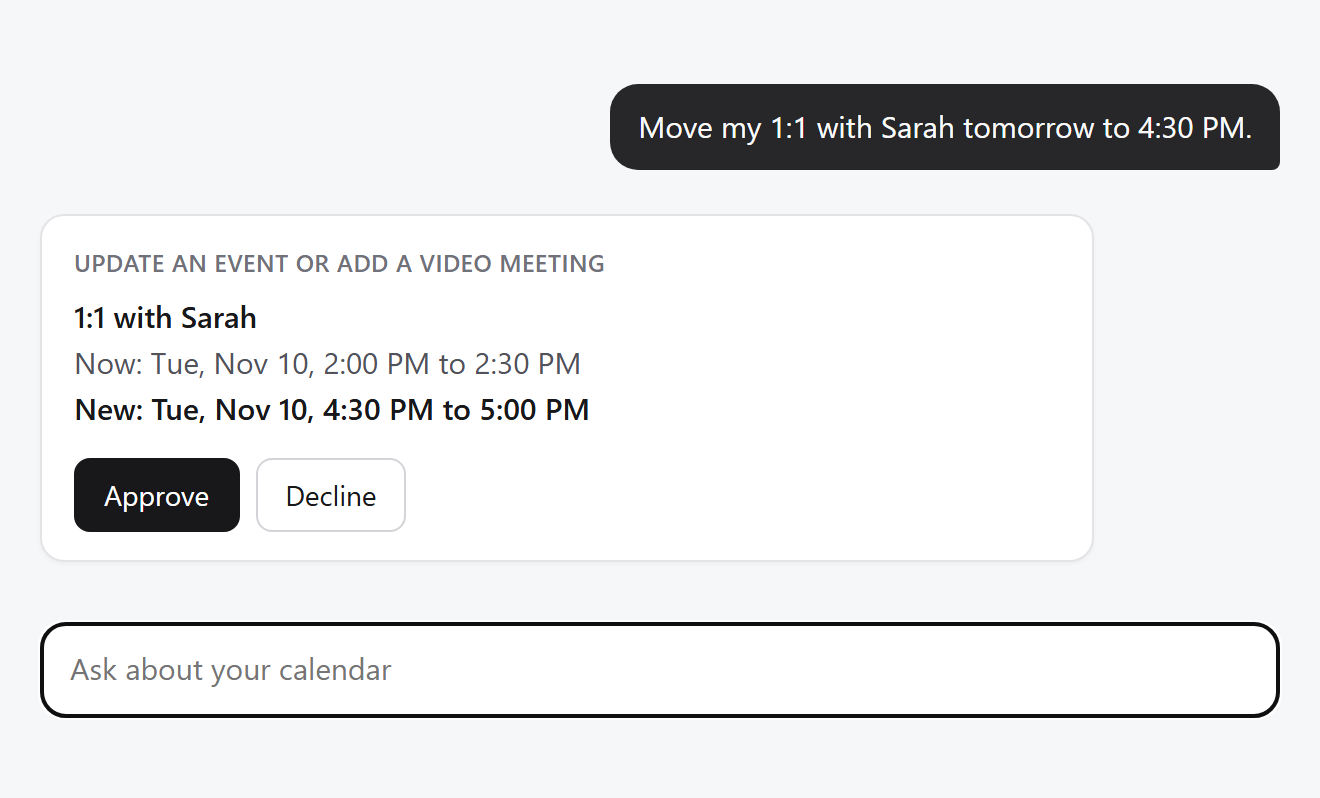
Show each change with Approve and Decline:
titlesays what the change does.eventis the event as it is now in Pyas, for a change to an event that already exists. Show its title and time: it's what the change is really about, whatever the model says. A new event has noevent, so show the title and times frominput.
Send the IDs the person approved to /chat/answer. The others are declined: the model is told, and they're never sent to Pyas.
Try it
- Run your server with a test key, and with
currentUserIdreturning'sandbox_user_1'. - Ask "What's on my calendar tomorrow?". The reply lists Avery's events, without asking anything.
- Ask "Book a 30 minute meeting tomorrow afternoon when I'm free." You get one change, "Create an event". Approve it, and the reply says it's booked.
- Ask it to delete that meeting, and decline. The meeting stays, and the reply says it was left as it was.
To go live, see Go live.